Dial-out Automatic Reporting by Standard Modem and GPS Mobile Phone

The following page details the automatic data reporting available using the NDACS 6000 series of data loggers using standard
modems and GSM mobile phones for remote field operations. Included are details for creating and sending automatic reports across the Internet and for direct connection by data servers.

The following page assumes the User is familiar with the operations of the NDACS 6000 web browser which can be accessed on-line at
www.ndacs.com via the demo system or locally if a unit has already been purchsed.

The on-line demonstration system currently only allows for Internet access however, a dial-up connection can be made should advance notification be provided in advance of the request to connect.

To access the on-line demonstration instrument see page

http://www.keynes-controls.com/RealTimeDemo/NDACSRealtimedemo.htm

for logon instructions.

To see an example of a Dial-out Internet Account Configuration File as supplied by a ISP to enable a dial-up Internet account to be accessed.
The example shown is obtained from FreeUk. Use
http://www.freeuk.com/dialup.php to create your own account in the UK

Dial-in Account Configuration


Example Auto Report Configuration

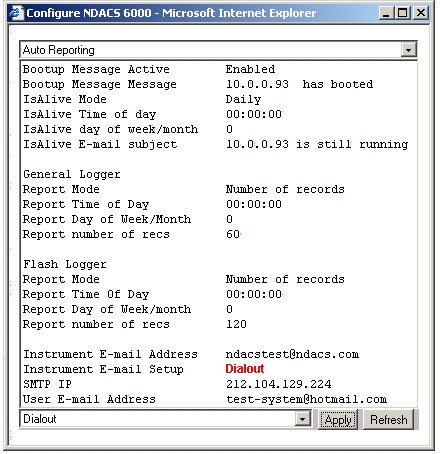
The following page demonstrates how to setup an NDACS 6000 to send E-mail reports for each 60 records of archived data within the General Logger and for 120 records of archived data stored by the Flash logger to an dial-up Internet account using SMTP IP addrress 212.104.129.224
using telephone number 044 0845 1264001 for the data connection. The recipients of the stored data
test-system@hotmail.com by an instrument using E-mail address ndacstest@ndacs.com.


Instructions To Follow For Dial-out Automatic Reports

1) Login into the NDACS 6000 Unit

2) Select “Configure System” button on the main instrument web page

Select “Auto Reporting” from the pull down menu list within the “Configure NDACS 6000” Window.

The Window displayed if
Fig 1 will appear.

3) Select “
Instrument E-mail Setup” and from the pull down menu list at the bottom of the Window select “Dialout” option.

Fig 1 Auto Reporting Window

autorepfig1.jpg

Assign E-mail Setup parameter to Dialout in order to make the NDACS instruments send e-mails via a dial-up Internet Service Provider (ISP).

E-mail address of the NDACS 6000 unit that appears in a Users E-mail Inbox upon receipt of a message from the instrument.

E-mail address of User to receive data from the NDACS 6000

Figure 1 shows the Auto Reporting Configuration Window detailing the operations of an NDACS 6000 to provide automatic data reporting via a Dial-up ISP account after recording information to a User with E-mail address “test-system@hotmail.com”.

The NDACS 6000 will also advise User “
test-system@hotmail.com” should the instrument reboot after it is first started.

Dial-up account SMTP account IP address.

4) Select the SMTP IP option and enter the dial-up account SMTP IP address for the specified Internet Service Provider (ISP) dial-up account.

See Example Configure.ins dial-up Internet Account Setup File - Typical Example sent by ISP to User requiring dial-up Internet account.

Assigning NDACS 6000 E-mail Address

5) Select “
Instrument E-mail address” option and enter an E-mail address that suitably identifies the instrument. Any address can be used
however the limitation on address settings is currently 80 characters. Full E-mail addressing is allowed. Example
ndacs@keynes.com

Assigning User E-mail Address

To send recorded information or instrument status messages to a specified User or group of Users then:

6) Select “
User E-mail address” option and enter the E-mail address of the User or Users that are to receive the instrument data.

The limitation on address settings is currently 80 characters. Full E-mail addressing is allowed.

Example heather@engineer.gov.uk; dataserver@test.com Note. semi-colon between addresses allows multiple Users to be specified.

Modem Configuration Settings Within NDACS 6000

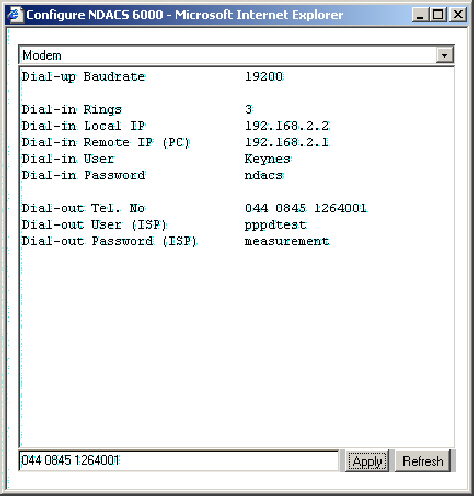
7) Select “Modem” from the pull down menu list within the “Configure NDACS 6000” Window. The Window displayed in Fig 2 will appear.


The Modem Window is used to define the dial-out settings to be used when the NDACS is used to send E-mils with attached data files and instrument status messages.

clipboard.jpg

IP Address used by the NDACS 6000 when answering a dial-up data connection request via standard telephone modem or GSM mobile phone.


IP address to which the Remote Dial-up computer is set after making the data connection to the NDACS

The automatic setting of the remote computer system IP address is part of the configuration of the Windows Operating systems dial-up account.

User-name required to login into the NDACS 6000 when accessed via a dial-in data connection such as modem or GSM mobile phone.

Password required to login into the NDACS 6000 when accessed via a dial-in data connection such as modem or GSM mobile phone.


Dial-out Telephone number used by the NDACS 6000 to dial to an ISP (Internet Service Provider) or data server in order to send E-mail data reports or status messages.

Dial-out User-name that is used to connect to a dial-up account at an ISP and is used as part of the login procedure.

Dial-out Password used to login into an ISP dial-in Internet account that is to be used to send E-mail data reports or instrument status messages.

Modem Configuration Window -

Configure.ins file content.

Dial-in account details

[Entry]
Entry_Name=FreeUK

[Server]
Type=PPP
SW_Compress=yes
PW_Encrypt=no
Negotiate_TCP/IP=yes

[TCP/IP]
Specify_IP_Address=no
Specify_Server_Address=yes
DNS_Address=212.126.144.2
DNS_Alt_Address=212.126.144.13
IP_Header_Compress=yes
Gateway_On_Remote=yes

[URL]
Home_Page=http://www.freeuk.net/
Search_Page=http://home.microsoft.com/access/allinone.asp
Help_Page=http://support.freeuk.net/
AutoConfig=0

[Proxy]
HTTP_Proxy_Server=www-cache.freeuk.net:3128
FTP_Proxy_Server=
Gopher_Proxy_Server=
Secure_Proxy_Server=
Socks_Proxy_Server=
Use_Same_Proxy=0
Proxy_Enable=1
Proxy_Override=<local>;*.freeuk.com;*.freeuk.net

[User]
Name=
pppdtest
Password=
measurement

[Phone]
Dial_As_Is=no
Phone_Number=1264001

Area_Code=0845

Country_Code=44
Country_ID=44

[Internet_Mail]
Email_Address=ndacsuser@freeuk.com
Email_Name=Ian Thomas
POP_Server=pop.freeuk.net
SMTP_Server=212.104.129.224
POP_Logon_Name=ndacsuser
POP_Logon_Password=ndacs

Auto Reporting Window - NDACS Config Factors

SMTP_Server = 212.104.129.224


Modem Window

Phone_Number = 1264001

Area_Code = 0845

Country_Code = 44
Dial-out User (ISP) = pppdtest
Dial-out Password (ISP) = measurement

Dial -in User = Keynes
Dial -in Password = ndacs


Sometimes the SMTP server address is shown similar to

SMTP_Server=relay.freeuk.net

to get the SMTP IP address that can be used within the NDACS 6000 then use the command:

ping relay.freeuk.net at a DOS prompt.


NDACS Web page - Fig 2