|
LogDAQ-ATMData Recording Softwarefor ATM Systems |
|
The LogDAQ-ATM is the data recording software available for use with the Keynes Controls ATM network range of instruments and works in collaboration with the SigDAQ-ATM analysis software. Its sole purpose is to record the data to disk from the instruments. The software can be used to record data in both binary and ASCII file formats enabling large experiments to be recorded and data be be extracted and processed using standard analysis tools. Binary format data files stores the largest amount of data in the smallest amount of file space. ASCII data files utilising comma separated variables make the recorded information easy to understand. |
Apart from recording data, the LogDAQ-ATM software can be used to convert the binary data files into ASCII CSV data files and to extract specified channels and store this reduced information into separate files for further analysis. The ASCII data files can be post processed by many mathematical analysis packages such as Maple and MathCAD. Figure 1 shows the main Window for the LogDAQ-ATM software. Selection of the Binary Format or ASCII format data files is provided by Tick boxes. The LogDAQ-ATM software runs under |
 Figure 1 |
|
The LogDAQ-ATM software works in collaboration to the ATM instrument configuration files. Once activated the configuration files are scanned to identify the available instruments. Channel SelectionSelecting the "All" button ensures that all channels of data from each instrument on the network is recorded. The option causes the largest files to be recorded. It is advised for large data files that the binary recording format is used. LogDAQ-ATM also allows a user to extract individual channel/channels from a archived data file. The extraction can also be for a set number of points from the start of the data file. |
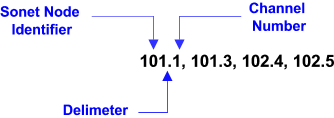
Selection of individual analogue input channels is as follows Enter each Node Identifier and channel number for each analogue channel to be extracted into the Channel list text box using the format shown below, see Figure 1. The channel selection format is as follows: Sonet Node Identified . Channel Number, ...., Node Identified.Channel Number
|
Figure 3 shows an example of the ASCII text file produced by the LogDAQ-ATM software, as shown the columns are clearly identified. Details for the layout for the binary format data files are stored in the password protected, file download area of the web site
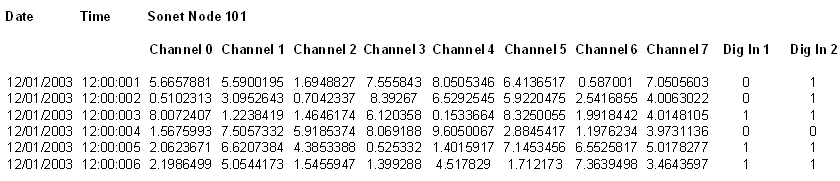 Figure 3 |
 |