
|
SeaDaqElectrical & Network Connections |
|
The following page details the electrical connections, and operating specifications for the SeaDAQ range of ATM instruments. The instruments can be deployed to form high speed, high resolution synchronised data acquisition and control system. For simplicity of the technical description only information detailing the instrument connections on a single network string will be considered here, full technical details can be found in the instrument manual. The SeaDAQ communicates over industry standard ATM networks making it possible to utilise any manufacturers suitable network equipment. No proprietary data protocols or hardware components are required. Any ATM switch manufacturers hardware can be used to extend the distances over which data can be transmitted and the network capacity. |
 |
The SeaDAQ contains electronically 3 separate
component parts they are, the Sonet Node, Power Supply and Data Acquisition
Unit. |
| Figure 1 |
|
The ATM network onto which the SeaDAQ instruments must conform to the 155.52 Mb OC3 Fibre Optic and STM-1 specifications. The maximum distance that can be reliably obtained between adjacent instruments for data acquisition operations is exactly the same as that specified for a Sonet Node within the ATM specifications, and is limited to a maximum separation of 100M when connected together using grade 5 UTP cable, 2 Km when using multi-mode fibre optic interface and 20 Km when using a single mode fibre interface. Regardless to the type of connection between nodes the way the instruments are connected together on a network remains the same. Figure 2 shows the schematic network layout for the instruments deployed on a single STM-1 (Copper) network string. Figure 3 shows the the instruments on a STM-1 network can be further enhanced by the additional connected to an OC-3 Fibre network in order to extend the range over which data can be transmitted. The synchronisation features of the instruments remains no matter how they are deployed. |
|
The Table 1 shows a summary of the sample rates versus number sonet nodes and therefore channels that can be deployed on a single SMT-1 and OC3 fibre optic network. In practice the sample rate of the instruments be incremented in steps of 8 KHz from 0 - a maximum sample rate of 96 KHz/channel. All instruments and channels are synchronised together. The digital input level readings are are synchronised to that of the analogue readings. It is currently not possible to mix sample rates between instruments connected together on the same network. |
| Sample Rate | Number Sonet Nodes | Number of Channels |
| 96 KHz | 6 | 48 |
| 48 KHz | 12 | 96 |
| 16 KHz | 36 | 288 |
| 8 KHz | 72 | 576 |
Each individual SeaDAQ instrument requires a 6 - 14V DC 3W supply.
| Description | Rating |
| Sonnet Node | 1 W |
| Data Acquisition System | 2.1 W |
| Total Instrument Power | 3.1 W |
|
Important Note. A single category 5 UTP cable can only provide power to 1 instrument if the same cable is used to provide the network connections is also used to provide power. It is recommended that a separate power cable be used to power multiple instruments on a network. |
|
Power Cable Losses. Category 5E UTP: Farnell Part no. 378-7953 has a conductor rating is 98.6 Ohm/Km For twin (pair) conductors. This corresponds to a maximum cable resistance of 20 Ohms/100m for cable links between nodes deployed at their maximum allowable spacing. Using a power supply rated at 12V, 250mA, the voltage drop across the Cat5 UPT cable will be 5V per 100m. This loss in voltage is acceptable as long as no more than 1 system should be placed on a pair of conductors. |
Conductor Size vs Resistance
|
The following table summerises the number of instruments that can be connected together on a single 100m of cable against various cable conductor cross-sectional areas. |
| Cable Cross-sectional Area ( Square mm) |
Resistance/Km | Instruments | Maximum Current Rating | ||
| 0.25 | 83 | ||||
| 0.5 | 40 | ||||
| 1 | 19 | 5 | 10A | ||
| 1.5 | 13 | 7 | 15A | ||
| 2.5 | 8 | 10 | 25A |
|
For very long lengths Keynes Controls recommends
|
|
Figure 2 shows how the SeaDAQ instruments are connected together on a standard ATM STM-1 network. Ensure that on installing the instruments that only Category 5 UTP cable is used for the network signals. As can be clearly seen the STM-1 network forms a loop back to the ATM interface and this the same no matter how many nodes are deployed together on a string. |
Figure 2

|
Figure 3 shows how the instruments can be simply combined with an OC-3 fibre optic interface to pass data to a remote PC. The media converters can be used to connect the instruments both single and multi-mode fibre cables in order to pass data over long distances. The Data Recorder computer must contain a suitable ATM interface card in order to process data from an ATM media converter. Multiple network strings connected to fibre optic media converters can be combined into a synchronised network using an ATM switch. The ATM switch can be used to connect multiple data processing computers to multiple network strings. |
Figure 3

|
Tables 1 and 2 are provided to show the pin-outs on the 19 way multi-way waterproof connectors. Table 1 shows the pin-outs for the analogue input signals connected to socket 1. Table 2 shows the power and network connections terminated on socket 2. |
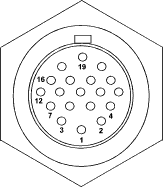 |
|||||||||||
| Pin-out | Description | Pin-out | Description | ||||||||
| 1 | Channel 1 +Vin | 10 | Channel 5 -Vin | 1 | ATM Transmit + | ||||||
| 2 | Channel 1 -Vin | 11 | Channel 6 +Vin | 2 | ATM Transmit - | ||||||
| 3 | Channel 2 +Vin | 12 | Channel 6 -Vin | 3 | ATM Receive + | ||||||
| 4 | Channel 2 -Vin | 13 | Channel 7 +Vin | 4 | ATM Receive - | ||||||
| 5 | Channel 3 +Vin | 14 | Channel 7 -Vin | 5 | Power +(6 - 14v)DC | ||||||
| 6 | Channel 3 -Vin | 15 | Channel 8 +Vin | 6 | Power -Vin | ||||||
| 7 | Channel 4 +Vin | 16 | Channel 8 -Vin | 7 | Digital Out 1 | ||||||
| 8 | Channel 4 -Vin | 17 | Gnd | 8 | Digital Out 2 | ||||||
| 9 | Channel 5 +Vin |
|
Figure 5 shows how adjacent instruments are connected together to operate on an STM-1 network. As can be observed below, the individual instruments are linked together to form a loop with the start and end of the network loop completing at the ATM interface card. The ATM interface can be the PCI card within the data logger PC or the network connections on a media converted. Each of the network signals occur as differential pairs, they are Tx + and Tx - and Rx + and Rx -. The instruments are connected such that the receive pair of 1 instrument are connected to the transmit pair of the adjacent unit. The final pair of network signals are connected back to the ATM interface. Figure 4 shows in practice how this is carried out. |

Figure 5
The above dimensions and electrical details are accurate at the time of publishing. Keynes Controls reserves the right to make changes without notification.
 |