
|
Highest level menu
item and is the default display item when the instrument |
|
SERIAL |
|
Sets the VibWire-108
to transmit data via the on-board transmitter unit. This options |
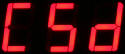
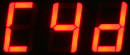
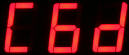
|
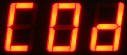
Channel 0 Display -
sets the display to show the frequency of sensor on channel |
|
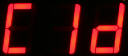
Channel 1 Display -
sets the display to show the frequency of the sensor on channel |
|
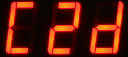
Channel 2 Display -
sets the display to show the frequency of the sensor on channel |
|
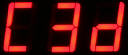
Channel 3 Display -
sets the display to show the frequency of the sensor on channel |
|
Channel 4 Display -
sets the display to show the frequency of the sensor on channel |
|
Channel 5 Display -
sets the display to show the frequency of the sensor on channel |
|
Channel 6 Display -
sets the display to show the frequency of the sensor on channel |
|
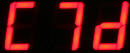
Channel 7 Display -
sets the display to show the frequency of the sensor on channel |
|
The VibWire-108 can be used as a stand-alone real-time interface when configured to display individual channel results. |
|
ANALOG |
|
Sets the VibWire-108 to
output analogue values only. Both vibrating wire and |
|
Selecting any of the
options C0d to C7d will show results continually on the display. Ideal
operation when |