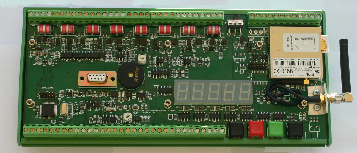
Example GPRS Configuration Settings
The following examples show the AT commands needed to connect to the 4 most popular GPRS networks in the UK. Other networks will be configured very similar to the ones below.
Virgin: SMS 800 Texts
PAYG: GPRS CONFIGURATION:
at+cgdcont=1,"IP","goto.virginmobile.uk","0.0.0.0",0,0
at#userid="user"
at#passw=""
at#sktset=0,4000,"82.152.20.37"
at#sktop
Vodafone: subscription only service
Data10 tarrif: 10MB + £2/MB there after
PAY-
at+cgdcont=1,"IP","pp.vodafone.co.uk","0.0.0.0",0,0
at#userid="web"
at#passw="web"
at#sktset=0,4000,"82.152.20.37"
at#sktop
at#userid="web"
at#passw="web"
at#sktset=0,4000,"82.152.20.37"
at#sktop
T-Mobile: depending on t-zone add-on
Zone dependent service
at+cgdcont=1,"IP","general.t-mobile.uk","0.0.0.0",0,0
at#userid="user"
at#passw="wap"
at#sktset=0,4000,"82.152.20.37"
at#sktop
Zone dependent service
at+cgdcont=1,"IP","general.t-
at#userid="user"
at#passw="wap"
at#sktset=0,4000,"82.152.20.37"
at#sktop
Orange:
Mobile office Pay-As-You-Go Service
Normal PAYG You may need to add access to data :
at+cgdcont=1,"IP","orangeinternet","0.0.0.0",0,0
at#userid=""
at#passw=""
at#sktset=0,4000,"82.152.20.37"
Configuring VibWire-108-GPRS for data transmission
The VibWire-108-GPRS requires 2 stages of configuration before information sent across the network and these are:
1) Assign instrument to activate the GPRS modem
2) Assign network details using terminal port
Setting Operation Mode
Before information can be sent across the GPRS network the modem has to be activated and this operation is undertaken from the keyboard.
To activate the real-time frequency display
1. Starting at
The “Basic” menu item is the first menu item available after the instrument is powered on.
2. Select “Menu In” button
3. Use the Up & Down Keys to select the option
GPRS
the other options available are:
“Analg SERAL C0d C1d C2d C3d C4d C5d C6d C7d” C0d = Channel 0 ........ C7d = Channel 7
Once the “GPRS” output is selected the “Menu Out” key has to be pressed to confirm this option.
Terminal Port & Hyper-
The GPRS network configuration is to complex to be undertaken using the keyboard by itself and so Keynes Controls use a terminal program to assign the AT commands to the modem.
The RS-232 port on the front of the instrument uses a standard 9 pin D connector modem cable to connect to a PC.
Factory settings are:
Baud rate = 115Kb Parity = Even 8 data bit - no stop bit
Terminal Program
Any terminal program can be used so long as the computer system being used can see the assigned serial port. Common Windows application is “Hyper Terminal” and this works correctly with the VibWire-108.
The RS-
Factory settings are:
Baud rate = 115Kb Parity = Even 8 data bit -
Terminal Program
Any terminal program can be used so long as the computer system being used can see the assigned serial port. Common Windows application is “Hyper Terminal” and this works correctly with the VibWire-