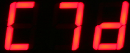
Menu Options & Glossary Of Software Terms
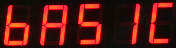
Highest level menu item and is the default display item when the instrument
is first powered on. It is the start point for changing menu options.
Configuring the Results Display
Sets the VibWire-108 to transmit data via serial port interface.
Used to activate data transmission using SDI-12 port on VibWire-108-SDI12
Used to activate cable free data transmission on VibWire-108-TRS24
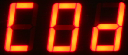
Channel 0 Display - sets the display to show the frequency of sensor on channel
0 only. Used for testing or configuring sensors when permanent results are required.
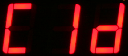
Channel 1 Display - sets the display to show the frequency of the sensor on channel
1 only. Used for testing or configuring sensors when permanent results are required.
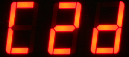
Channel 2 Display - sets the display to show the frequency of the sensor on channel
2 only. Used for testing or configuring sensors when permanent results are required.
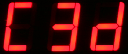
Channel 3 Display - sets the display to show the frequency of the sensor on channel
3 only. Used for testing or configuring sensors when permanent results are required.
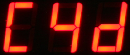
Channel 4 Display - sets the display to show the frequency of the sensor on channel
4 only. Used for testing or configuring sensors when permanent results are required.
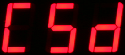
Channel 5 Display - sets the display to show the frequency of the sensor on channel
5 only. Used for testing or configuring sensors when permanent results are required.
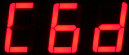
Channel 6 Display - sets the display to show the frequency of the sensor on channel
6 only. Used for testing or configuring sensors when permanent results are required.
Channel 7 Display - sets the display to show the frequency of the sensor on channel
7 only. Used for testing or configuring sensors when permanent results are required.
The VibWire-108 can be used as a stand-alone real-time interface when configured to display individual channel results.
Sets the VibWire-108 to output analogue values only.
Assigning Cable Free or Analogue Output Operating Mode
Continuous Results Display
Selecting any of the options C0d to C7d will show results continually on the display. Ideal operation when
continuous vales need to be observed by an operator.
Sets the VibWire-108 to transmit SDI-12 format data across serial port.
Ideal for many general purpose applications