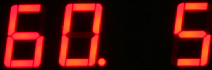
Setting the Transmitter Update Time
The update rate for the transmitted data can be User defined and only applicable in low speed end of node operations. When connected to a Keynes Gateway system or Data-centre the update time can be controlled remotely by the database software enabling a remote user to change the sample at any time.
End-of-node Operations
This mode of operation is only used when the VibWire-108-TRS24 is used as an end of network node and in low power mode. When connected to a permanent power source and using continuous network connection the the update rate is determined by the network.
The VibWire-108 repeatedly sends the sensor results to the receiver unit at pre-defined intervals in order to guarantee that the information is received.
Should the receiver unit not receive the sensor signals within a specified time limit then alarm system operations can be configured to inform the operator. Alarm features are a function of the receiver and logger unit and are a standard feature of the Keynes Controls Logger Units.